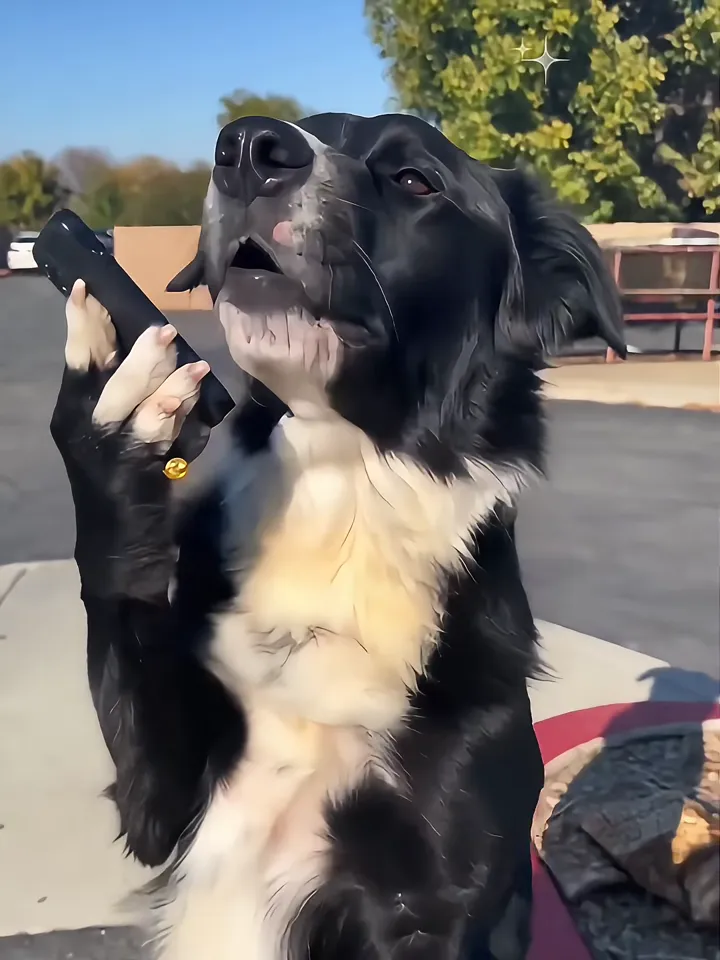
A dog standing on its hind legs with a phone at its mouth is one of the most-shared versions of this trend, because the line lands harder when a pet says it. Upload a photo of your dog or cat and the template stands it up in a sunny lot, phone in paw, mouth moving with the original sound.
Tips for the pet on the phone
Use a photo where the whole animal is visible and in focus, with its face toward the camera: markings are copied from the photo.
Short-snouted pets (pugs, Persian cats) get less mouth movement; long-snouted dogs look the most like they are talking.
One animal per photo. Two pets in one photo can merge into one.
What is already set for you
The subject: the exact animal from Image 1 (same breed, coat colours, markings, ears and size) standing upright on its hind legs like a person and holding a black smartphone in one front paw.
The scene: a sunny parking lot with a low wall and trees, clear blue sky, hard midday light.
The timing: Every template follows the same sound: the question from 0.3 to 4.1 seconds, a silent read, the reply at 5.8, the complaint from 8.6 to the end.
With the Pet on the Phone template, Become Millionaire AI turns your photo (one per person on a two-person template) into a become millionaire ai video set in a sunny parking lot with a low wall and trees, clear blue sky, hard midday light. Upload it, select the template and generate.
What does the pet on the phone look like?
On Become Millionaire AI, the pet on the phone is the exact animal from Image 1 (same breed, coat colours, markings, ears and size) standing upright on its hind legs like a person and holding a black smartphone in one front paw. It is a generic design with no brand marks.
Can I use a cat instead of a dog for Pet on the Phone?
Yes. Pet on the Phone on Become Millionaire AI takes a clear photo of one dog or cat and keeps its breed, colours and markings. Cats move their mouths less than long-snouted dogs, so the talking reads more subtly, and a front-facing photo helps most.